Every new hire needs access on day one, and how you grant it shapes your security risk for as long as they're with you.
IT onboarding covers more than introductions to colleagues and a workspace. It includes hardware and software setup, security protocols, communication and collaboration tools, and employee training.
Without clear onboarding standards, new employees may feel overwhelmed or set up to fail, and the organization may face cybersecurity threats it could've avoided.
Cyber criminals often target employees, because compromising a person can be easier than breaking a technical control
Every employee onboarding plan needs a pre-orientation checklist. This is where IT prepares in advance for the new employee's secure introduction to the network.
Why automate the onboarding process?
Automating the onboarding process reduces the chance of human error and makes each step consistent. Automated workflows built from your checklist help onboarding run the way your organization and your new hire expect.
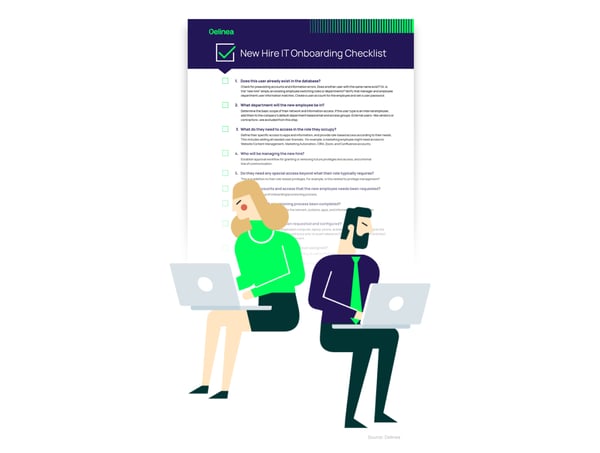
IT onboarding checklist
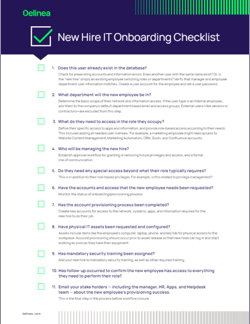
Use these 11 questions to set up a new hire from the day they're hired through their first week. Each one helps give the new employee the access their role needs, and nothing more.
1. Does this user already exist in the database?
Check for preexisting accounts and information errors. Does another user with the same name exist? Or is the “new hire” simply an existing employee switching roles or departments? Verify that manager and employee department user information matches. Create a user account for the employee and set a user password.
2. What department will the new employee be in?
Determine the basic scope of their network and information access. If the user is an internal employee, add them to the company’s default department-based email and access groups. Leave external users, such as vendors and contractors, out of this step.
3. What do they need to access in the role they occupy?
Define their specific access to apps and information, and provide role-based access according to their needs, granting no more than the role requires. This includes adding all needed user licenses. For example, a marketing employee might need access to website management, marketing automation, customer relationship management, Zoom and Confluence accounts.
4. Who will be managing the new hire?
Establish an approval workflow for granting and removing future privileges and access, and a formal line of communication.
5. Do they need any special access beyond what their role typically requires?
Treat this as an exception to role-based privileges. For privileged access, require approval, record who approved it and set an end date where possible.
6. Have the accounts and access needed by the new employee been requested?
Monitor the status of the onboarding and provisioning process.
7. Has the account provisioning process been completed?
Create new accounts for access to the network, systems, apps and information required for the new hire to do their job.
8. Have physical IT assets been requested and configured?
Assets include items like the employee’s computer, laptop, phone and key fob for physical access to the workplace. Account provisioning should occur before asset release so that new hires can log in and start working as soon as they have their equipment.
9. Has mandatory security training been assigned?
Add your new hire to mandatory security training, as well as other required training.
10. Has follow-up occurred to confirm the new employee has access to everything they need to perform their role?
Check in with the new hire and their manager after the first few days, and fix any gaps without granting extra access.
11. Have your stakeholders been told the new hire is set up?
Notify the manager, Human Resources, Apps and Help Desk teams about the new employee's provisioning success.
Download the IT Onboarding Checklist
If any question on the checklist goes unanswered during onboarding, the new hire could end up with the wrong access. Human Resources, Security and IT should work together to build a repeatable, auditable and automated process to ensure accuracy. For new employees in key roles that need access to sensitive or privileged accounts, monitor that process closely.
Identity and Access Management (IAM) and Privileged Access Management (PAM) tools both offer workflows to manage IT onboarding and the life cycle of these accounts. Paired with regular user access reviews, well-defined workflows can help you find and reduce cybersecurity issues caused by over-permissioned employees, former employees whose accounts are still active and employees who have moved departments. They can also help flag segregation of duties policy violations.
Why is a systematic onboarding process necessary?
Between January 2013 and June 2016, the Alberta Motor Association's former vice president of Information Technology submitted and approved 55 fraudulent invoices, taking nearly $8 million. At the time, the association paid invoices once a single employee with sufficient authority signed them. In 2018, he was sentenced to five years in prison.
That's a segregation of duties failure. Roles that separate duties like submitting and approving payments, assigned at onboarding and checked in regular access reviews, make gaps like this easier to catch early.
Start security awareness training on day one
With the pre-orientation IT onboarding checklist taken care of, orientation can begin. Depending on your organization, the process may take hours or days. I recommend allocating at least a day to the process, because a strong employee onboarding program needs well-delivered cybersecurity awareness training.
New employees may bring poor cybersecurity habits with them, such as reusing passwords. Your training should be engaging, informative and ongoing, not a slide deck people sit through once.
Cybersecurity awareness training is critical, and it should start on a new hire's first day in the workplace. Orientation introduces them to your network and cybersecurity best practices, and it shows how much cybersecurity awareness they already have.
Cyber criminals target everyone from interns to CEOs. That makes cybersecurity everyone's responsibility, and day one is the time to say so.
Give new hires the right privileged access with Secret Server
Secret Server keeps privileged credentials in an encrypted vault, with role-based access, approval workflows and a full audit trail. New hires get the privileged access their role needs, and you have the records to prove it. Try the Secret Server interactive demo.