What is network level authentication?
Network level authentication (NLA) is a security feature of Microsoft's Remote Desktop Protocol (RDP) that requires users to authenticate before a remote session is established. This pre-authentication step reduces the risk of unauthorized access, conserves server resources and helps protect credentials in transit. NLA covers only RDP, and it answers one question: who may start a session. It does not control what a user can do once connected.
With NLA, the server won't allocate session resources until the user's credentials are verified. Unauthenticated connection attempts are refused before a desktop session exists.
How NLA works
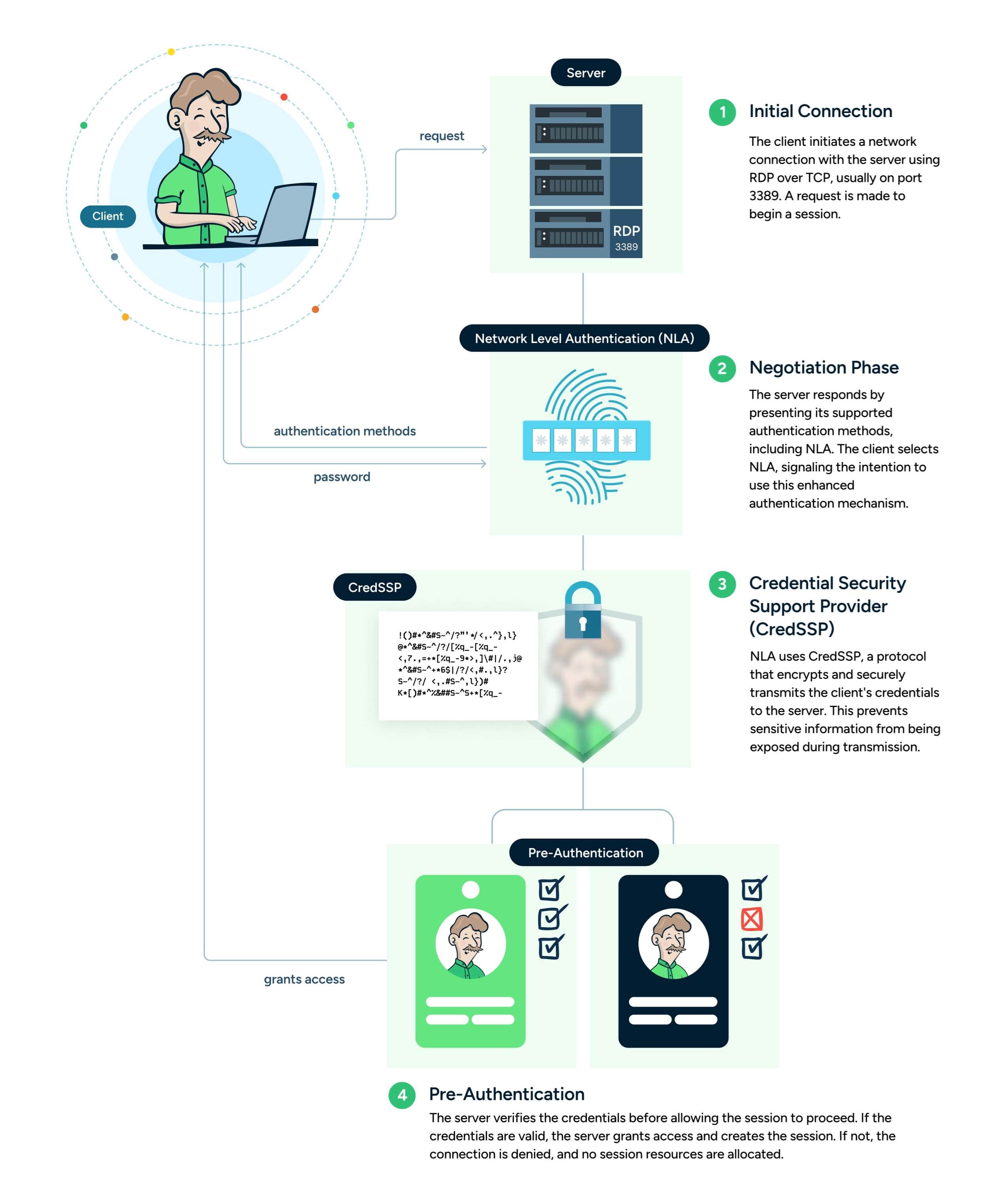
When a client connects to an RDP server with NLA enabled, the connection goes through five steps:
- Initial connection. The client opens a network connection to the server using RDP over TCP, usually on port 3389, and asks to begin a session.
- Negotiation. The client tells the server which security protocols it supports, including CredSSP for NLA, and the server selects one. When the server requires NLA, it selects it, and a client that can't use it is refused.
- Credential Security Support Provider (CredSSP). NLA uses CredSSP, a protocol that authenticates the user and passes their credentials to the server over an encrypted TLS channel, so sensitive information isn't exposed during transmission.
- Pre-authentication. The server verifies the credentials before allowing the session to proceed. If the credentials are valid, the server grants access and creates the session. If not, the connection is denied and no resources are allocated.
- Session establishment. Once authenticated, the remote desktop session is established and the user gains access to the system.
Benefits of NLA
NLA adds three things to an RDP deployment:
- Protects against unauthorized access. By requiring authentication before a session starts, NLA limits log-in attempts to authenticated users and reduces the risk of unauthorized access.
- Reduces resource usage. NLA keeps the server from allocating memory and CPU to unauthorized or failed connection attempts.
- Helps defend against credential interception and denial-of-service (DoS) attacks. NLA passes credentials over an encrypted channel and stops unauthenticated connections from consuming session resources. Clients should still validate the server's certificate, and NLA reduces exposure to DoS attacks without removing it.
Limitations of NLA
NLA does one job well. Its limits show up in environments that run more than RDP:
- Single-protocol coverage. NLA protects only RDP sessions. SSH, Kubernetes, database and cloud connections need their own controls, so organizations that use several protocols need a way to apply consistent access policy across all of them.
- Authentication only. NLA answers who may start a session. It doesn't decide which servers a user may reach, when or under what conditions, and it doesn't limit or record what they do once connected. Organizations usually add access policy, just-in-time access and session recording on top.
- Client and server requirements. NLA requires a client that supports CredSSP and a supported Windows Server on the host. Older or third-party RDP clients may not support it, which can lead administrators to switch it off while troubleshooting connections.
Should NLA be disabled?
Disabling NLA is generally not recommended; it weakens security by allowing unauthenticated users to initiate remote connections. In some cases, such as troubleshooting compatibility issues or working in a tightly controlled environment, disabling NLA temporarily may be necessary.
If NLA is disabled, put alternative security measures, such as firewalls or a VPN, in place to protect the server from unauthorized access, and limit which systems can reach the RDP port. Over the longer term, an access management tool that brokers RDP connections and applies policy and logging adds the layers NLA doesn't cover, with NLA kept enabled wherever deployment supports it.