There are more employees with access to critical business application than ever before.
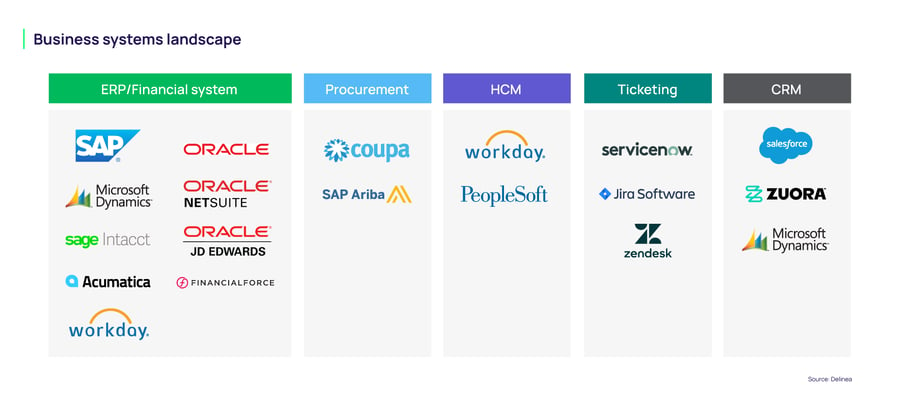
Many organizations run 10-15 different business applications to manage critical functions like financial transactions, HR operations, and customer data. And these functions span an increasingly interconnected environment. For example, a finance manager may use one application to set up a vendor and another, potentially disconnected system, to pay them. This makes it difficult for security, audit, and application teams to identify excessive access and risky combinations of privileges.
Companies need to implement strong internal controls that support security principles such as least privilege and zero trust. They likely have the data to do it, but the volume of roles and permissions, along with application complexity turn that data into noise, which breeds analysis paralysis: You know something needs attention, but not what, or where.
In this blog we’ll discuss how AI is well suited for reviewing and analyzing security data from critical business applications, allowing companies to improve their security posture and ensure that all human, machine or AI identities have the appropriate level of access.
The tools and approach for successful analysis
We’ll walk through three examples: a segregation of duties (SoD) review, a security and licensing cleanup, and an anomaly hunt using telemetry data. All three follow the same basic pattern. Once you’ve done it once, you can apply this approach to almost any question you want to ask of your business application data:
-
Identify the problem you want AI to help with. Be specific about the decision you are trying to make.
-
Export the source data the AI will need to reason over: user and role assignments, license information, telemetry, change logs and so on.
-
Craft the prompt so the AI knows its role, the format you want back, and the rules it should follow.
-
Analyze and validate the results. AI is a powerful assistant, not a rubber stamp. Always spot-check its output before acting on it.
You can use any AI tool your organization prefers to perform the analysis. This includes Claude, ChatGPT, or Perplexity.
With the approach and tools in mind, let's walk through three areas where AI can make a real difference.
Example 1: Performing a segregation of duties review prior to an audit
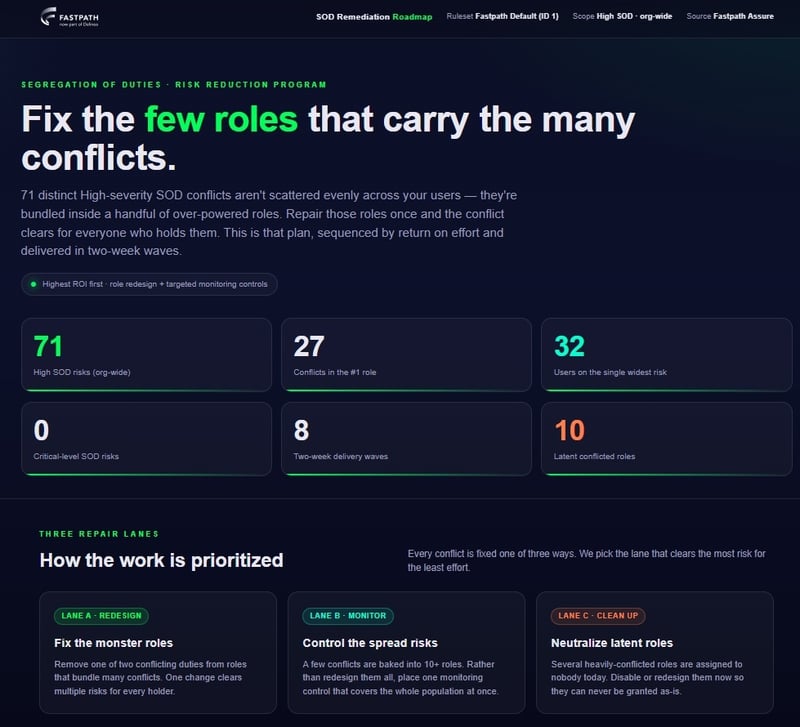
The problem: Segregation of duties is one of the most scrutinized areas in any audit. The idea is simple: No single person should be able to perform two conflicting activities that, when combined, create the opportunity for fraud or error. For example, creating a vendor and paying that vendor.
The challenge is that in a modern business application, access is granted through layers of roles, duties and privileges
A single user may be assigned dozens of roles. Manually tracing every user's access back to conflicting combinations across thousands of users is slow, error-prone and almost never finished before the auditor walks in the door.
How AI helps: AI is strong at reasoning over exactly this kind of layered, high-volume data. You start by exporting the building blocks: your list of users, your security roles and the associations between them.
This is the same user, role and user-role-assignment data you would pull for any access review. You then provide the AI with your SoD ruleset (the pairs of activities that should never be held by the same person) and ask it to flag every user who holds a conflicting combination, explain why each combination is a conflict and rank the findings by risk.
Instead of a spreadsheet you have to interpret yourself, you get a prioritized list of the specific users and access combinations that need attention, along with plain-language reasoning you can hand to a reviewer or auditor. That allows you to find and remediate the highest-risk conflicts before your audit.
AI has done the heavy lifting of finding the needles in the haystack. Just spot check the flagged conflicts against the source system before you act.
Example 2: Looking for security and licensing optimizations
The problem: Over time, access sprawls. Users accumulate roles they no longer need, some roles are never assigned to anyone and some users are assigned no roles at all. On top of that, most business applications now tie licensing to the access a user is granted, which means over-provisioned access frequently drives overspending on licenses.
Left unchecked, this creates two problems: too much access and unnecessary license spend
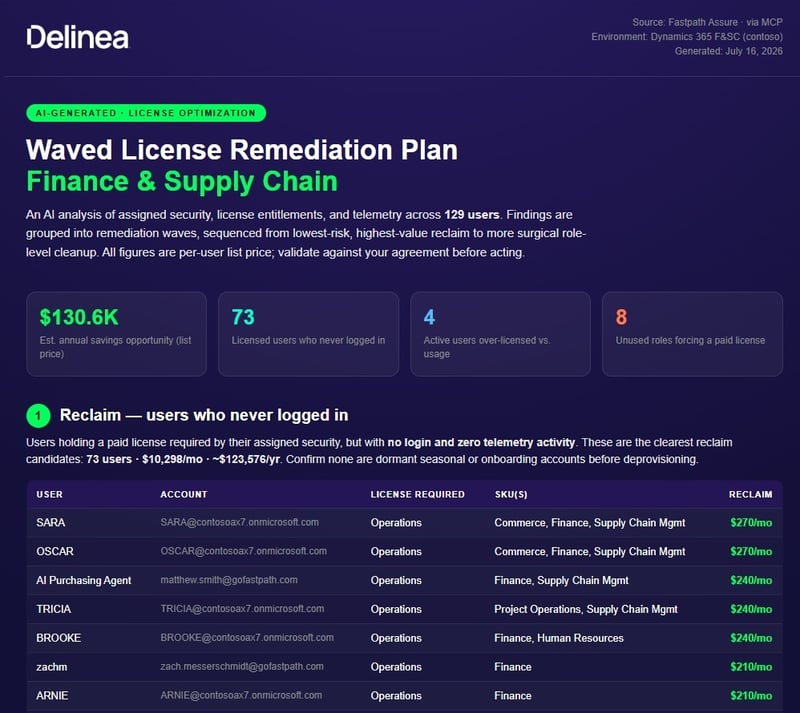
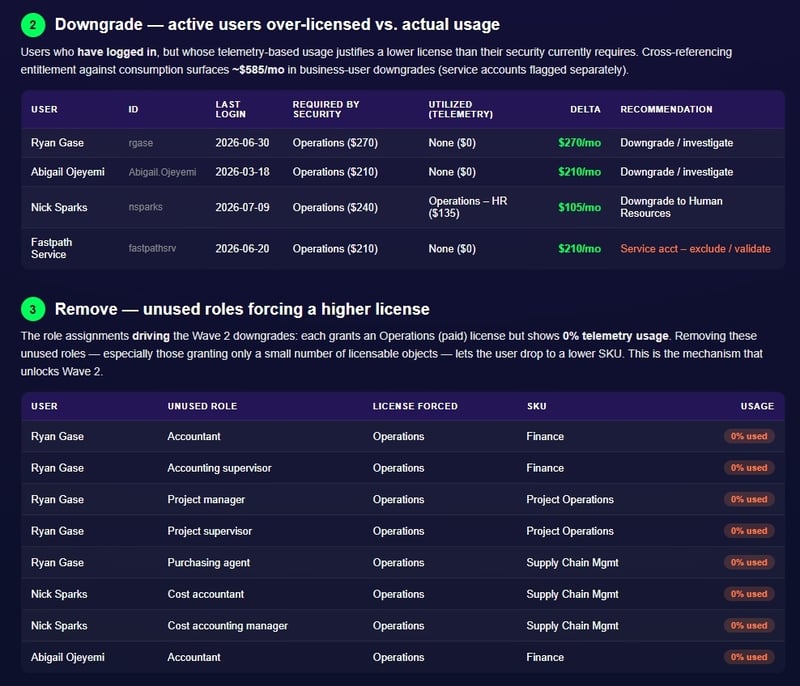
How AI helps: This is where AI can quickly turn raw access and license data into an action plan. Start by exporting your user, role and user-role-assignment data along with your license requirement information. Feed that to the AI and it can surface the obvious cleanup opportunities right away: users with no roles assigned, roles assigned to no users and users carrying an unusually high number of roles that are worth a closer look.
On the licensing side, AI can go a step further and build a prioritized remediation plan. It can identify users who are assigned a more expensive license than their role requires. It then groups those findings into “waves” so your team can tackle the highest-value changes first, and estimates the impact of each wave.
The result is a clear, phased roadmap for tightening access and reducing license spend. This kind of analysis would take a specialist days of manual spreadsheet work. Once again, validate the recommendations against the live system before making changes, since license and role definitions can be nuanced.
Example 3: Identifying usage anomalies from telemetry and change tracking
The problem: The first two examples look at what access a user has. But a complete security picture also depends on what a user actually does.
A user might be perfectly entitled to a piece of access on paper, yet their behavior tells a different story
Those actions may be access granted but never used, a sudden spike in activity, changes made at unusual times or configuration changes that no one expected. These signals rarely show up in a standard access review, because access data alone doesn’t capture behavior over time.
How AI helps: The process is the same as the previous two examples. The difference is the data you bring in. In addition to user access data, you will also export telemetry data (records of what users actually accessed and how often) and change tracking data (records of what was changed, by whom and when). You then ask the AI to establish what “normal” looks like and to flag anything that deviates from it.
That opens up questions you simply can’t answer from access assignments alone. AI can compare granted access against actual usage to highlight access that has never been exercised, a strong candidate for removal under least privilege. It can spot a user whose activity suddenly jumps well beyond their historical baseline, or configuration changes made outside normal business hours.
Both surface as anomalies worth investigating. Because you are asking the AI to reason over patterns rather than follow a fixed rule, this is a job for AI, not a simple report. It turns two data sources that are usually ignored into an early-warning system.
As with the other examples, treat the flagged anomalies as leads to be investigated and validated by a human, not as conclusions.
A single application access governance solution, one that uses AI to help control access to critical systems, is key to a strong security posture. In the examples above we walked through the process by hand.
The real payoff comes when that process is built directly into the tools you already use to govern access so the export, analysis and validation happen where your data already lives. That is exactly the direction we are heading with Delinea Fastpath solutions, and it’s something I am excited to share more about soon. Stay tuned.

Reduce access risk across business apps