Companies are rapidly adding systems, applications, data, and identities, including machine identities and AI agents. Each addition expands access pathways and increases the difficulty of maintaining visibility and control over who has access to what, and what actions they can take.
Left unmanaged, this leads to a steady increase in identity-related risk, including insider fraud.
User Access Reviews (UARs), also known as access certification campaigns, are the established process for managing that risk: periodically reviewing access across the enterprise and determining whether it remains appropriate.
UARs are not new. They have been a required IT general control (ITGC) for decades. But the scale of today’s environments, which span on-premise, hybrid, and cloud applications, and include human and machine identities everywhere, has made manual user access review programs increasingly insufficient. In this blog, I’ll explain why automation is now essential, walk through a practical UAR checklist, and explain how Fastpath Access Review puts control back in the hands of Business Process Owners (BPOs) of these critical business applications.
Why user access reviews matter more than ever
The concept behind least-privilege access is simple: Users and identities should have only the access their job function requires. UARs are the primary control for ensuring that the principle holds over time.
Without them, companies accumulate risk through:
-
access creep: Users retain permissions long after job roles change.
-
terminated employee accounts that remain active in business applications.
-
overprovisioned accounts created with limited knowledge of the user’s actual role.
-
machine identities, APIs, and AI agents with unchecked access to sensitive data.
Regulatory frameworks reinforce this need. Compliance mandates, including SOX, GDPR, HIPAA, and PCI-DSS, require periodic access certifications as foundational control.
The problem with manual reviews
When the number of users and applications was small, manual UARs were manageable. That time has passed. 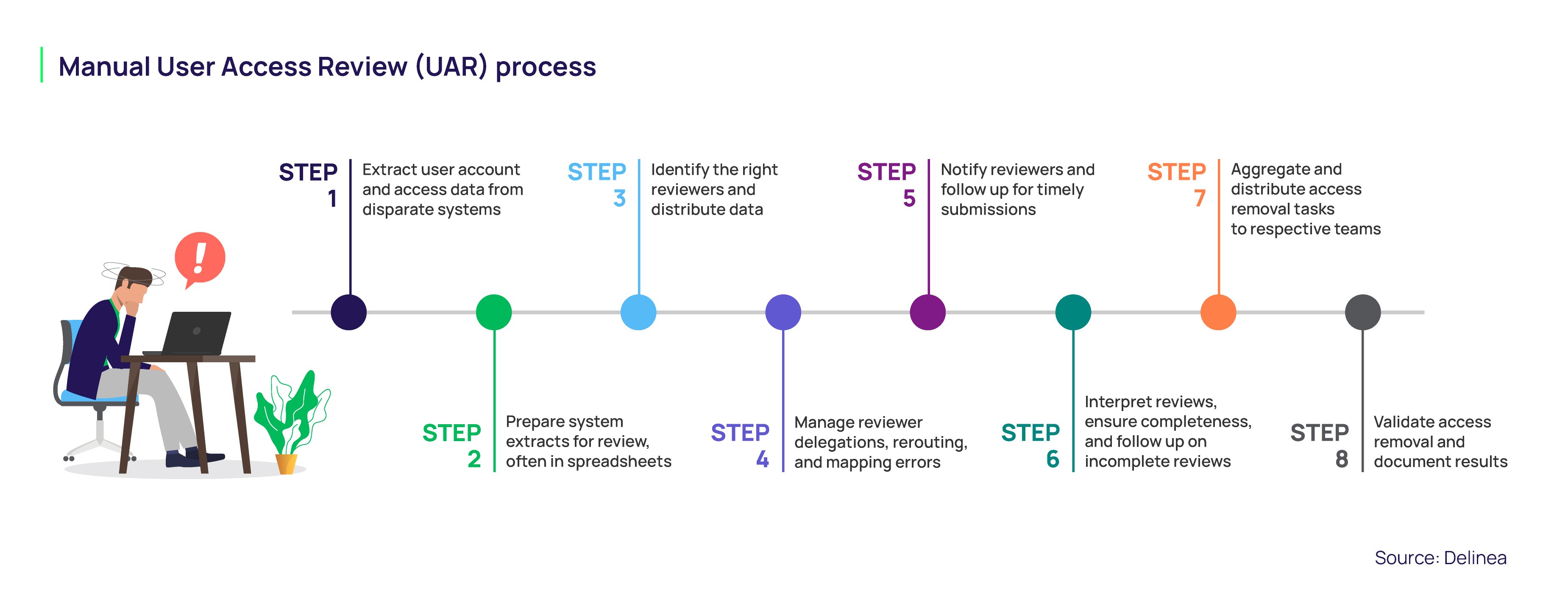 Today, a typical business process owner or IT admin running a manual UAR must:
-
extract user account and access data from multiple disparate systems. This includes ERP systems, SaaS apps, and legacy platforms, each with different formats and naming conventions.
-
format and organize data, often by exporting it to spreadsheets and building pivot tables—which is time-consuming and introduces a high risk of human error.
-
identify the right reviewers and distribute data to them individually. Determining ownership is not always straightforward, and misrouted reviews can delay the process.
-
manage delegations when reviewers are unavailable, reroute reviews, and map errors between users, roles, and applications.
-
track completion and follow up on overdue responses. Without automation, tracking progress and sending reminders is time-consuming and fragmented.
-
interpret results, confirm completeness, coordinate access removals, and collect evidence.
-
aggregate and distribute access removal tasks to respective teams.
-
validate access removal and document results. Gaps in documentation or missed removals can lead to unresolved risk.
For IT admins and BPOs at large enterprises, this means reviewing thousands, sometimes hundreds of thousands, of lines of access data per cycle. For example, Norwegian Cruise Line Holdings (NCLH) had 450 unique reviewers, 14,000 users, and approximately 300,000 lines of access across its in-scope SOX applications. Managing that volume through email and spreadsheets was, by the company’s own account, manual, time-consuming, extremely risky, and prone to error.
UARs are also time-consuming for reviewers, typically business application owners and supervisors in Finance and HR. Reviewers must dedicate sufficient time and due diligence to ensure UARs meet the objective of the control, which is to mitigate risk, rather than just check a box.
In practice, UARs often occur near the end of a quarter, when reviewers are focused on financial close activities, making them a lower priority. In addition, reviewers may lack granularity into the security role design to fully understand what a reviewer can do with their access, limiting their ability to make informed decisions.
A practical checklist for building an access certification program
To save time and improve the success of your periodic UARs, clearly define your in-scope applications, follow a repeatable process, and leverage automated workflows.
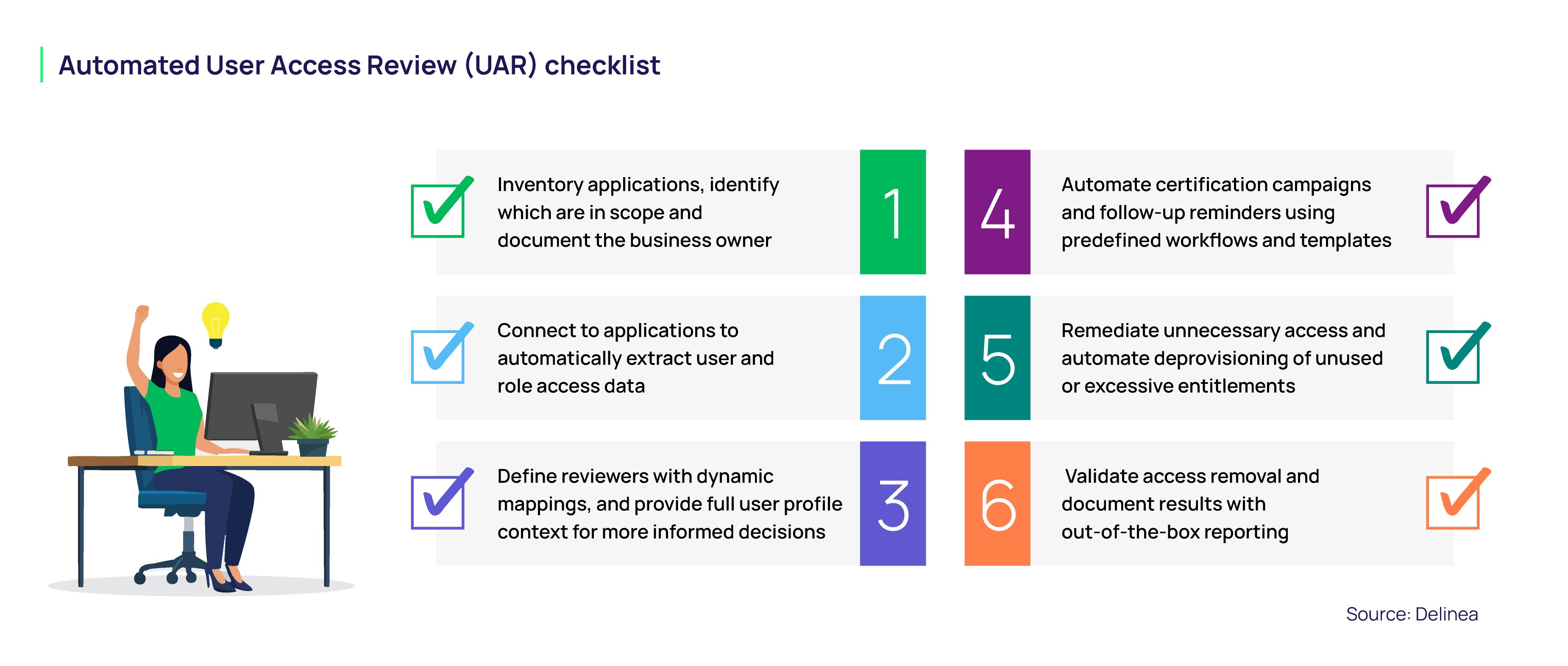
1. Inventory applications
Start by identifying your business applications in scope. This typically includes ERP, HCM, CRM, procurement, finance, and other systems that contain sensitive data or support critical business processes.
For each application, document the business process owner, technical owner, type of data, business function, and compliance relevance.
2. Assess risk, set review frequency, and extract data
Not every system carries the same level of risk. Rank applications based on importance to the business, sensitivity of data, regulatory requirements, and fraud or operational risk. High-risk systems may require quarterly reviews. Lower-risk systems may be reviewed less frequently. The key is to define a risk-based cadence and apply it consistently.
When using an automated solution, you can connect directly to your applications to extract user and role access data—eliminating the time spent extracting that data from multiple disparate systems and manually preparing those extracts for reviewers.
3. Define reviewers and ownership
The right reviewer matters. A reviewer should understand the user’s job responsibilities and the access being reviewed.
Automation can help by using dynamic ownership mapping based on attributes like department, location, manager, job title, or role ownership. This reduces the maintenance required when people change jobs and helps route reviews to the right person.
Make sure to give reviewers the context they need. Reviewers need more than a username and role name. They need identity context, access context, and application context. This helps to ensure reviews are not just a ‘check the box exercise,’ due to an uneducated reviewer.
That may include job title, department, location, manager, assigned roles, entitlements, related application access, and available replacement access. The goal is to make it easier for reviewers to make informed decisions without searching through multiple systems.
4. Execute the reviews and track completion
Once the access review certification campaign is launched, reviewers should receive clear instructions and automated reminders. Administrators should be able to monitor completion from a centralized dashboard and quickly identify overdue reviews or routing issues.
An automated solution streamlines the review process with predefined workflows and templates, including follow-up reminders to keep reviewers on track. You can also reduce reviewer fatigue by focusing only on changes since the last review.
5. Remediate unnecessary access
A UAR is not complete when a reviewer clicks “remove.” Access must actually be changed in the source system.
Rejected access should be aggregated, sent to the appropriate team, removed, and validated. This is a critical step for audit evidence and control effectiveness. Automation is possible at this step through an integration with an identity provisioning solution.
6. Validate access removal and document results
Finally, document the review. Evidence should show who reviewed access, what decision was made, when it was made, what access was removed, and whether remediation was validated.
This is what auditors want to see. It is also what management needs to understand the health of the user access review process.
What automation delivers: Real customer results
The cost in human hours is significant. Research by Hobson & Company, based on interviews with Fastpath customers, found that companies spend a substantial amount of time on manual access reviews. Across customer interviews, Fastpath reduced time spent on access reviews by up to 80%, with some customers reporting savings of 120 hours per quarter.
Fastpath customers across industries have documented significant time savings and risk reduction.
Once we implemented and got the Fastpath Access Review product set up, we saved 100 man-hours right off the bat. ~ John Jezek, Business Systems and Release Manager, ChemTreat
ChemTreat, one of the largest industrial water treatment companies in the world, was spending more than 100 hours per quarter preparing for access reviews, with the actual review process consuming the better part of five days. After deploying Fastpath Access Review, quarterly audit preparation dropped from more than 100 hours to just one hour, and the company achieved 100% reviewer participation by replacing manual tracking with automated scheduling and reporting.
Fastpath saved us enough time for our team to take on an additional 7 system UARs—translated to a savings of approximately 300 hours a year.” ~ Director of IT Compliance, Norwegian Cruise Line Holdings (NCLH)
Norwegian Cruise Line Holdings' IT compliance team—responsible for SOX UARs covering 450 reviewers and 14,000 users across 14 systems— replaced its email-and-spreadsheet process with Fastpath Access Review. The result was not just time savings. The team was also able to expand coverage to additional systems, strengthening its overall compliance posture.
Fastpath has been an Alltech partner for many years. Their solutions support and facilitate our small team’s ability to manage our ERP systems’ security. ~ Connie Thompson, Global Director of IT Data, Analytics and Reporting, Alltech
Alltech, a global agriculture company operating in more than 140 countries, faced a similar challenge after migrating to Microsoft Dynamics 365 Finance & Supply Chain. Its quarterly access reviews had originally required manual data extraction and email-based approvals, limiting accuracy and scalability. With Fastpath Access Review, reviews are now assigned to regional role owners with direct system knowledge, improving accuracy while reducing IT support requirements.
Automating UARs strengthens least privilege
A well-executed access certification program is not just a compliance checkbox. It is a foundational control for enforcing least-privilege access across the enterprise. Modern security frameworks and regulatory requirements treat it as a baseline expectation.
The challenge is operationalizing it at scale. Fastpath Access Review is purpose-built to automate the full UAR process. It connects directly to 50+ ERP and business applications—including Microsoft Dynamics 365, SAP, Oracle, NetSuite, Salesforce, and Workday—and delivers the scheduling, reviewer assignment, notification, and reporting capabilities organizations need to run UAR programs that actually work.
Whether you are building a UAR program from scratch or modernizing a manual process that has outlived its usefulness, Fastpath provides the structure, automation, and audit-readiness that today's compliance and security requirements demand.
To learn more about Fastpath Access Review and how it can reduce the time and risk associated with your UAR program, download the whitepaper Automating Your Control Environment